Connect Snowflake read-only
A username and password, or a key pair. Bicycle only ever sees what the role you give it can see.
Connect Snowflake read-only. Bicycle watches your revenue-critical KPIs, names the cause, and recommends the next step. First agent in about 15 minutes.
No credit card·Real product, real data
It falls on mobile web. The cause is a payment provider's certificate rotation, and it lives in your gateway logs, not in your warehouse.
The drop is already true in your tables. It becomes a question only when a person opens the dashboard and decides something looks off.
Cortex writes the SQL once you decide which metric, which window, which drivers. It confirms the drop in that segment, quickly and well.
Cortex reasons over what is in Snowflake. The certificate rotation is in your gateway logs. Reaching them, correlating them, and acting on what you find are three systems you build and maintain.
The drop surfaces on its own, ranked by revenue impact, with the segment and the device type already named. Nobody had to go looking.
Cause analysis tests drivers inside and outside Snowflake, ties the drop to the certificate rotation, and rules out a code deployment in the same window.
Escalate to the payment provider, recommended to the owner who can approve it. Previewed, bounded, reversible, logged.
The signature is kept, so the next drop with this shape is recognized the moment it appears.
Bicycle runs on top of Cortex and your warehouse rather than replacing them. What it adds is the detection you did not have to schedule, cause analysis that reaches past the warehouse boundary, and a governed next step.
Also compared: Dashboards · Build your own
Connect Snowflake read-only and the agent comes to life across the surfaces your team already lives in: alerts, data stories, chat, and dashboards. All from the same KPI and the same approved definitions. About 15 minutes after you connect.
KPI movement, surfaced before anyone asks. Checkout completion falls on mobile web, and the alert names the surface, the size of the drop, and what caused it.
The week or the quarter, as slides. What changed, why it changed, and what it cost, assembled into a deck you can present and share. Alerts cover today. Data stories cover the stretch.
Every follow-up, grounded. Ask why, ask where, ask what changed, and the answer comes back with its evidence attached.
Dashboards you did not have to build. Bicycle creates them from the KPIs it onboarded, and you can ask for another in plain language. They sit alongside the dashboards you already have.
A real Snowflake connection, start to finish: connect, pick an agent, watch the model assemble.
A username and password, or a key pair. Bicycle only ever sees what the role you give it can see.
Pick only the tables your agent needs. Fewer tables, fewer warehouse queries, lower compute cost.
Bicycle reads your schema and proposes the agents your data can already support. Checkout completion rate, payment decline analysis, cart recovery by channel, and more.
Confirm three screens. Data model, KPIs, patterns, thresholds. About 10 to 15 minutes, and we email you when it's ready.
Tell it when your warehouse loads. Set it to 2 AM and it analyzes a complete day rather than a half loaded table. That is the difference between a real alert and a false one.
Bicycle classifies your tables into events and dimensions, maps each one to its source, and sets a refresh schedule per object. Every inference is visible, and every one is editable. You keep the guardrails.
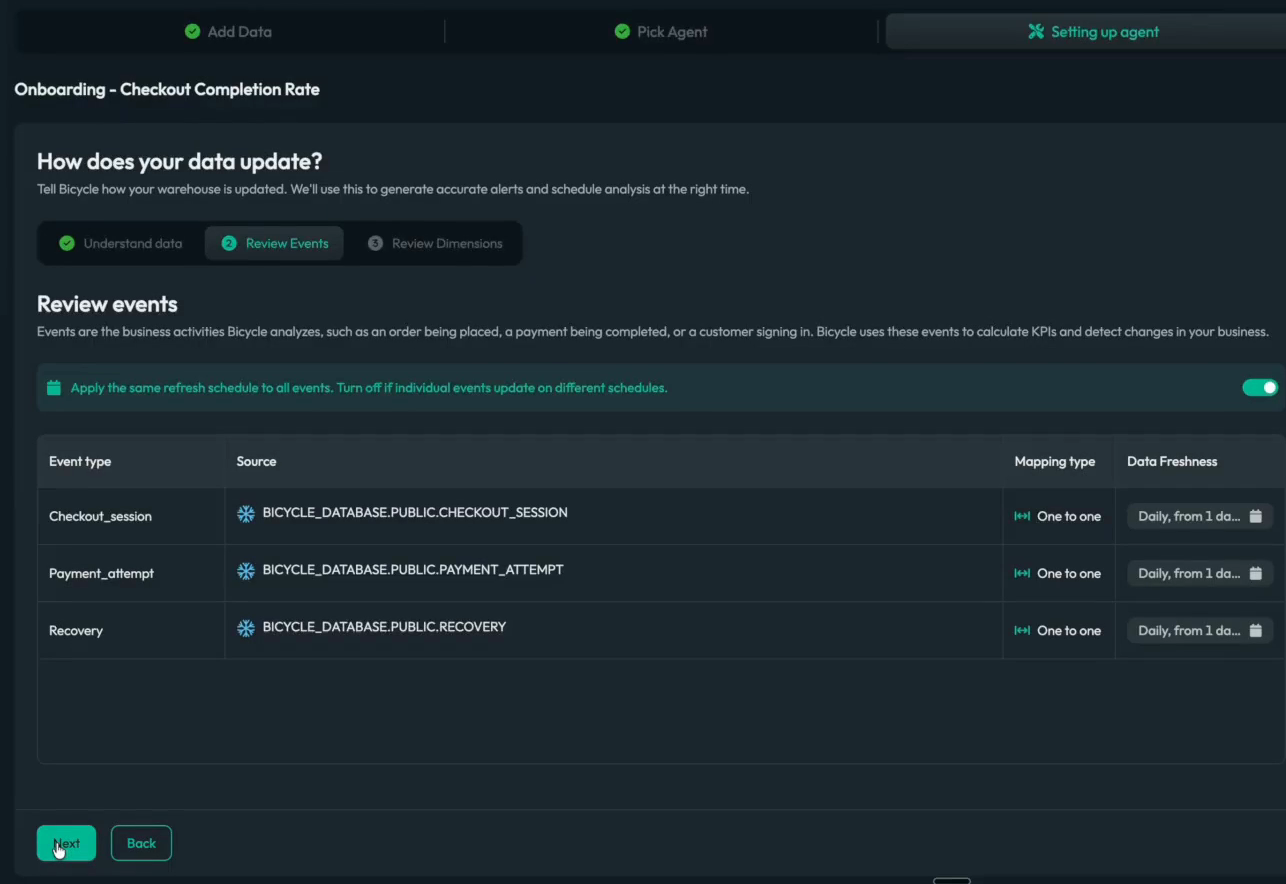
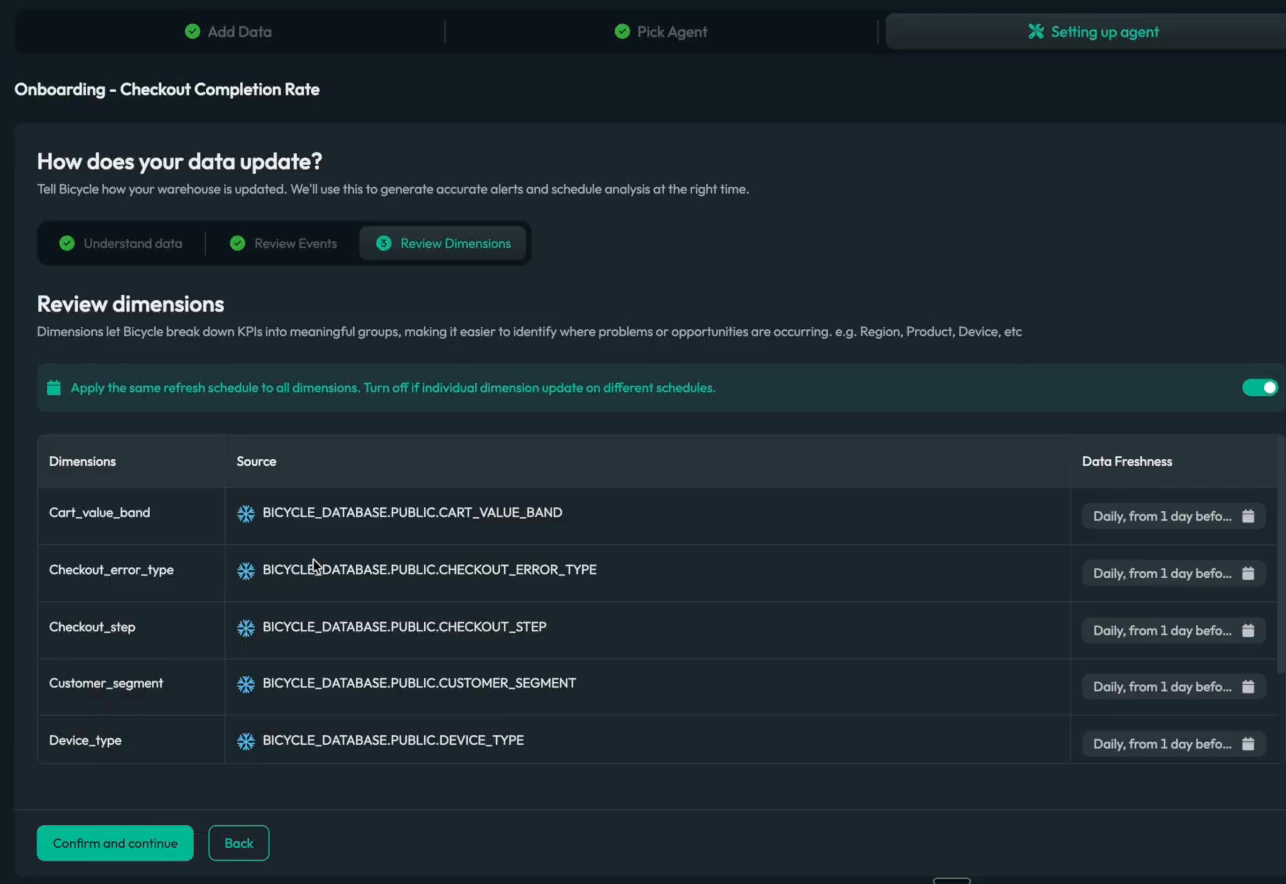
Your data team sets the guardrails and the agent runs inside them, which keeps the recurring investigations off the analyst queue without giving up control of what gets trusted.
Bicycle never writes to your warehouse.
Your data is not copied out of Snowflake.
You pick the tables. Nothing outside that scope is visible.
Every inferred mapping, KPI, and threshold is yours to change.
Read-only, in place, live in about 15 minutes.
No credit card · Real product, real data
 bicycle.ai/snowflake